Features
Change or cancel with a clear next step
Reconsider an agreed place and time, clear outdated RSVPs, or cancel and reinstate a plan while keeping its history understandable.
Reviewed 2026-10-14 against Huddl 0.9.29. Updated 2026-10-14.
On this page
Change the arrangement, then ask again
When the agreed place or time needs reconsidering, use Change Plan on the confirmed card and accept the reset prompt. This clears its earlier attendance answers so they cannot be mistaken for consent to a different arrangement.
Add or compare the available options and select the replacement place and time. Confirming the revised pair marks its confirmer Going. The other members must inspect the current arrangement and give a new answer.
Read the Confirm and change a plan transcript
- The picnic has two location options and one shared Saturday time on the same unconfirmed card. Members use hearts to express preferences; select one place and the time, or compare its inline recommendations.
- Read the exact place and time, choose Confirm Plan, and accept the prompt. Confirmation saves this pair and automatically records the confirmer as Going.
- The confirmed card shows attendance and each member can answer independently. Preference hearts are not the headcount.
- Choose Change Plan and confirm the reset. Earlier RSVPs are cleared. Add the replacement Buffalo AKG location while retaining the Saturday time, confirm the revised pair on this same card, and ask participants to answer again.
Follow the same plan through its states
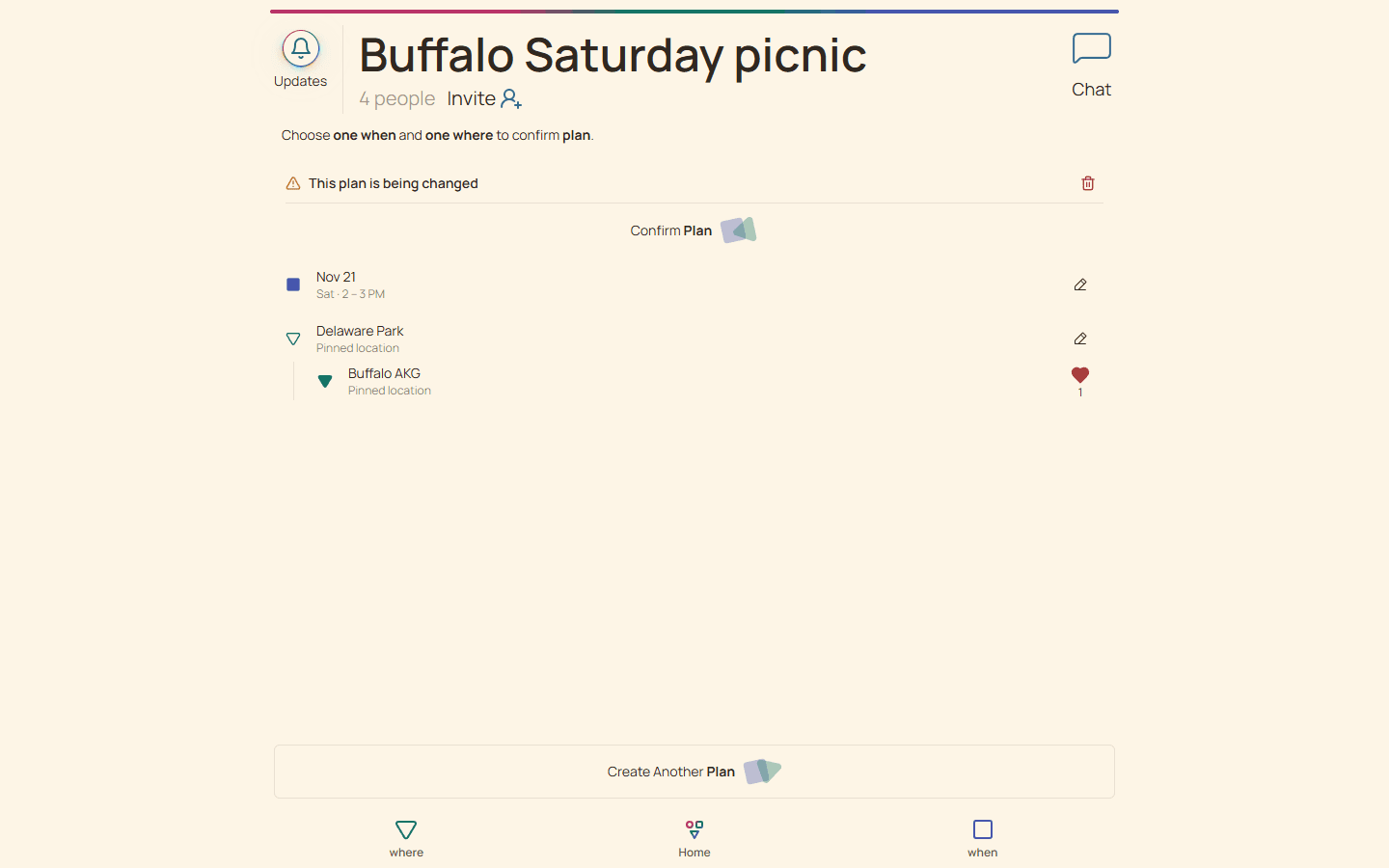
Updates explains a plan change alongside its prior choices. Use the current saved card for decisions and bookings; historical attendance describes the previous arrangement.
If the group restores the original place and time after starting a change, cleared RSVPs are still not silently restored. Ask for fresh responses rather than treating the old count as current.
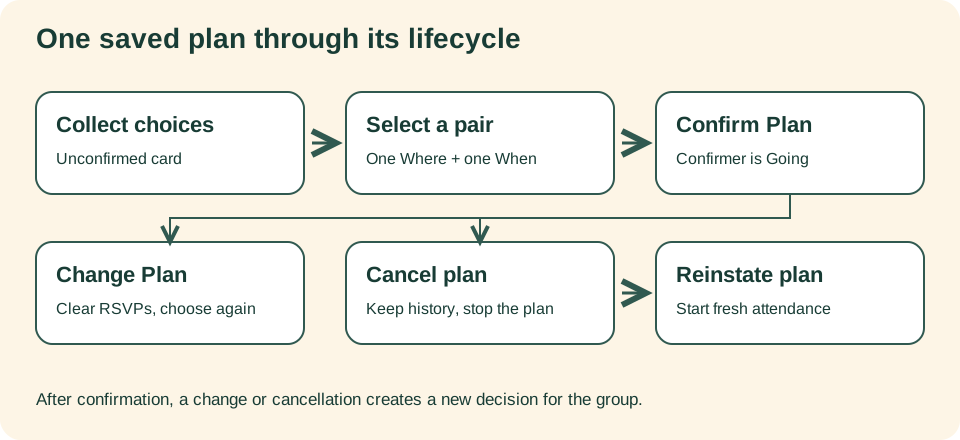
Collect options on an unconfirmed card, select one place and one time, and confirm the pair. Changing resets attendance before a revised confirmation. Cancellation preserves history; reinstatement begins with fresh RSVPs.
Cancel when the gathering will not happen
Open the attendance menu and choose Cancel plan, then confirm the cancellation. Other members can acknowledge the cancelled plan in Updates using Yep, cancel. Acknowledgment records awareness; it is not an RSVP.
If the arrangement becomes viable again, I’m still going opens the reinstatement confirmation. Reinstate plan starts fresh attendance with the reinstating member Going. Previously recorded attendees are not automatically recommitted.
Read the Cancel and reinstate a plan transcript
- Open the plan attendance menu, choose Cancel plan, and accept the confirmation. The cancelled arrangement retains its history rather than remaining an active commitment.
- Other members see the cancellation in Updates. Yep, cancel acknowledges it for that person; a notification alone does not prove they have read it.
- If the arrangement can happen after all, choose I’m still going and confirm Reinstate plan. The reinstating member is Going; previous attendees must respond again.
Carry the practical consequences through
Changing Huddl does not cancel a restaurant reservation, refund a ticket, or call someone already traveling. Assign those actions explicitly, and use a direct channel when the consequence is urgent.
For a fictional rainy picnic, first verify an indoor alternative. Reset the plan, confirm the indoor pair, request new RSVPs, and separately arrange the booking and transport changes. If no suitable alternative exists, cancel rather than leaving an obsolete plan active.
| Action | Attendance consequence | Outside Huddl |
|---|---|---|
| Change Plan | Earlier responses are cleared | Recheck travel, cost, access, and bookings |
| Confirm revised pair | Confirmer is Going; others answer again | Tell participants what changed |
| Cancel plan | The arrangement stops being active | Cancel reservations or supplies where needed |
| Reinstate plan | Fresh attendance begins | Check the provider still supports the arrangement |
Choose the action that fits the decision
Reinstatement does not restore every old response or reverse a provider cancellation. Verify the current card, attendance, and external commitments before relying on the reopened arrangement.
| Action | Meaning | Attendance consequence |
|---|---|---|
| Change Plan | Reopen the agreed arrangement | Clear old answers and ask about the replacement |
| Cancel Plan | The gathering will not happen as planned | Old intentions remain historical |
| Reinstate | Reopen the canceled arrangement | Confirmed plan: actor Going; others answer anew. Unconfirmed plan: stays unconfirmed |